
Appearance
Android Studio 对接
Github
网络验证 Android工程示例 :完成卡密登录、卡密解绑、卡密充值 用户登录、用户注册、用户解绑、用户充值 心跳维护等功能
https://github.com/kauth-coder/kauth-android
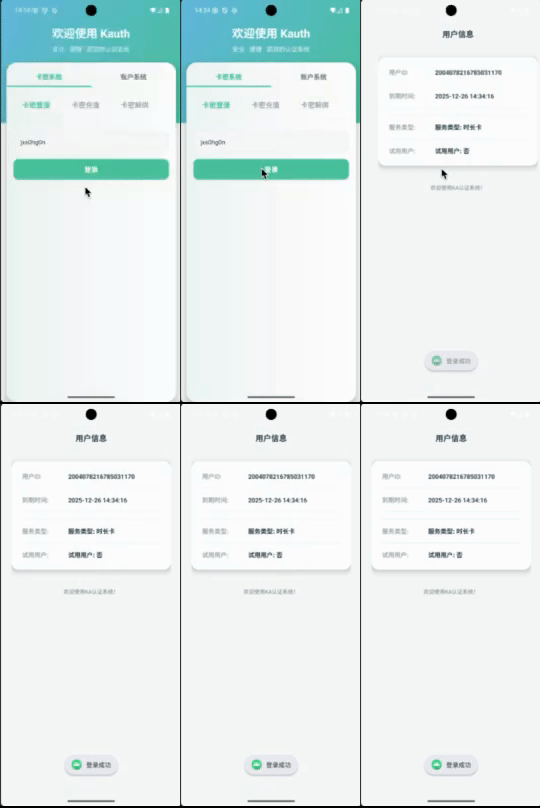
以上是 Android Studio 工程登录操作演示
快速集成
Maven
您可以在 Maven Central 查看最新版本。

Groovy
groovy
implementation 'cn.kauth:kauth-java:1.0.3'Kotlin DSL
kotlin
implementation("cn.kauth:kauth-java:1.0.3")Application 初始化 SDK
java
public void onCreate() {
    super.onCreate();
    // 初始化Timber日志框架
    Timber.plant(new Timber.DebugTree());
    deviceId = generateDeviceId();
    //初始化配置
    InitConfigReq initConfigReq = new InitConfigReq();
    initConfigReq.setApiDomain("https://api.kauth.cn");
    initConfigReq.setProgramId(1959821336266936321L);
    initConfigReq.setProgramSecret("F77VzI7UWAElpWrz");
    initConfigReq.setMerchantPublicKey("MIGfMA0GCSqGSIb3DQEBAQUAA4GNADCBiQKBgQCIpy3ae27yDJOUd5rW/S6tUbAmt/AqJm+VPonT9WJn5VME4FkYJUwdBmIWpzANVQmU+7CA3wv5eVFIOW0xMv9EyoFWDRR24Jt/hgDsZQtUPMaZPivKWxx2S4n4SJWWrGdIRkdC3+fmxrEri1qYicq8PO7mDIrwPR2I0USoKKOFMwIDAQAB");
    initConfigReq.setSignType(KauthSignEnums.SIGN_TYPE_RSA);
    KauthApi.init(initConfigReq);
    keyValueStorage = new KeyValueStorage(this, String.valueOf(initConfigReq.getProgramId()));
}
卡密登录验证
java
KaLoginRequest kaLoginRequest = new KaLoginRequest();
kaLoginRequest.setKaPwd(cardKey);
kaLoginRequest.setDeviceId(KauthApplication.deviceId);
kaLoginRequest.setPlatformType("android");
KauthApiService kauthApiService = KauthApi.getKauthApiService();
kauthApiService.kaLogin(kaLoginRequest).enqueue(new Callback<ApiResult<LoginResponse>>() {
    @Override
    public void onResponse
    (Call < ApiResult < LoginResponse >> call, Response < ApiResult < LoginResponse >> response){
        ApiResult<LoginResponse> apiResult = response.body();
        if (Objects.isNull(apiResult)) {
            Toast.makeText(getContext(), "登录失败:", Toast.LENGTH_SHORT).show();
            return;
        }
        if (!apiResult.getSuccess()) {
            Toast.makeText(getContext(), "登录失败:" + apiResult.getMsg(), Toast.LENGTH_SHORT).show();
            return;
        }
        //不管是卡密登录、账号密码登录、试用登录  都需要保存token 和 用户信息
        //----- 保存用户信息开始
        SessionManager.setAccessToken(apiResult.getData().getToken());
        SessionManager.setUserInfo(apiResult.getData());
        //----- 保存用户信息结束
        KauthApplication.getKeyValueStorage().save("kaPwd", cardKey);
        Toast.makeText(getContext(), "登录成功", Toast.LENGTH_SHORT).show();
        // 跳转到首页
        Intent intent = new Intent(getActivity(), HomeActivity.class);
        startActivity(intent);
        if (getActivity() != null) {
            getActivity().finish();
        }
    }

    @Override
    public void onFailure (Call < ApiResult < LoginResponse >> call, Throwable throwable){
        Toast.makeText(getContext(), "登录失败", Toast.LENGTH_SHORT).show();
    }
});
SDK 使用
获取 API 服务实例
java
KauthApiService kauthApiService = KauthApi.getKauthApiService();SDK 功能列表
相信你作为一个 Android 程序员 能看懂retrofit2怎么使用 如果实在不知道,可以参考本工程的使用例子
java
package cn.kauth.sdk;

import cn.kauth.sdk.info.request.*;
import cn.kauth.sdk.info.response.*;
import retrofit2.Call;
import retrofit2.http.Body;
import retrofit2.http.POST;

public interface KauthApiService {

    // ==================== 用户认证模块 ====================

    /**
     * 获取图形验证码
     *
     * @param captchaRequest 验证码请求参数
     * @return 验证码响应结果
     */
    @POST("/api/consumer/user/captcha")
    Call<ApiResult<CaptchaResponse>> getCaptcha(@Body CaptchaRequest captchaRequest);

    /**
     * 用户密码登录
     *
     * @param pwdLoginRequest 密码登录请求参数
     * @return 登录响应结果
     */
    @POST("/api/consumer/user/pwdlogin")
    Call<ApiResult<LoginResponse>> pwdLogin(@Body PwdLoginRequest pwdLoginRequest);

    /**
     * 通过卡密进行登录
     */
    @POST("/api/consumer/user/kaLogin")
    Call<ApiResult<LoginResponse>> kaLogin(@Body KaLoginRequest kaLoginRequest);

    /**
     * 退出登录
     */
    @POST("/api/consumer/user/loginOut")
    Call<ApiResult<Void>> loginOut();

    /**
     * 试用登录
     */
    @POST("/api/consumer/user/trialLogin")
    Call<ApiResult<LoginResponse>> trialLogin(@Body TrialLoginReq trialLoginReq);

    /**
     * 用户注册
     */
    @POST("/api/consumer/user/register")
    Call<ApiResult<RegisterResponse>> register(@Body RegisterRequest registerRequest);

    /**
     * 账号充值
     */
    @POST("/api/consumer/user/recharge")
    Call<ApiResult<Void>> recharge(@Body RechargeRequest rechargeRequest);

    /**
     * 以卡充卡
     */
    @POST("/api/consumer/user/rechargeKa")
    Call<ApiResult<Void>> rechargeKa(@Body KaRechargeKaReq rechargeKaRequest);

    /**
     * 修改密码
     */
    @POST("/api/consumer/user/changePassword")
    Call<ApiResult<Void>> changePassword(@Body ResetPwdRequest resetPwdRequest);

    /**
     * 解绑设备
     */
    @POST("/api/consumer/user/unbindDevice")
    Call<ApiResult<Void>> unbindDevice(@Body UnbindDeviceRequest unbindDeviceRequest);

    /**
     * 未登录状态下,卡密解绑设备
     */
    @POST("/api/consumer/user/unbindDeviceKaPwd")
    Call<ApiResult<Void>> unbindDeviceKaPwd(@Body UnbindDeviceKaPwdRequest unbindDeviceKaPwdRequest);

    /**
     * 获取用户信息
     */
    @POST("/api/consumer/user/userInfo")
    Call<ApiResult<UserInfo>> userInfo();

    /**
     * 心跳
     */
    @POST("/api/consumer/user/pong")
    Call<ApiResult<Void>> pong();

    // ==================== 配置管理模块 ====================

    /**
     * 更新用户配置
     */
    @POST("/api/consumer/custom/config/updateUserConfig")
    Call<ApiResult<Void>> updateUserConfig(@Body UpdateCustomConfigReq updateCustomConfigReq);

    /**
     * 获取用户配置
     */
    @POST("/api/consumer/custom/config/getUserConfig")
    Call<ApiResult<GetCustomConfigResp>> getUserConfig();

    /**
     * 更新卡密配置
     */
    @POST("/api/consumer/custom/config/updateKaConfig")
    Call<ApiResult<Void>> updateKaConfig(@Body UpdateCustomConfigReq updateCustomConfigReq);

    /**
     * 获取卡密配置
     */
    @POST("/api/consumer/custom/config/getKaConfig")
    Call<ApiResult<GetCustomConfigResp>> getKaConfig();

    // ==================== 程序管理模块 ====================

    /**
     * 获取程序详情
     */
    @POST("/api/consumer/program/detail")
    Call<ApiResult<ProgramDetailResponse>> getProgramDetail();

    /**
     * 获取服务器时间
     */
    @POST("/api/consumer/program/serverTime")
    Call<ApiResult<ServerTimeResp>> getServerTime();

    // ==================== 脚本错误模块 ====================

    /**
     * 报告脚本错误
     */
    @POST("/api/consumer/scripterror/report")
    Call<ApiResult<Void>> reportScriptError(@Body ConsumerProgramScriptErrorReportReq scriptErrorReportReq);

    // ==================== 设备管理模块 ====================

    /**
     * 卡密解绑设备
     */
    @POST("/api/consumer/device/cardUnBindDevice")
    Call<ApiResult<Void>> cardUnBindDevice();

    // ==================== 远程控制模块 ====================

    /**
     * 获取远程变量
     */
    @POST("/api/remote/getRemoteVar")
    Call<ApiResult<RemoteNormalVarResp>> getRemoteVar(@Body GetRemoteVarReq getRemoteVarReq);

    /**
     * 获取远程数据
     */
    @POST("/api/remote/getRemoteData")
    Call<ApiResult<RemoteNormalVarResp>> getRemoteData(@Body GetRemoteVarReq getRemoteVarReq);

    /**
     * 添加远程数据
     */
    @POST("/api/remote/addRemoteData")
    Call<ApiResult<Void>> addRemoteData(@Body RemoteDataAddReq remoteDataAddReq);

    /**
     * 更新远程数据
     */
    @POST("/api/remote/updateRemoteData")
    Call<ApiResult<Void>> updateRemoteData(@Body RemoteDataUpdateReq remoteDataUpdateReq);

    /**
     * 删除远程数据
     */
    @POST("/api/remote/deleteRemoteData")
    Call<ApiResult<Void>> deleteRemoteData(@Body RemoteDataDeleteReq remoteDataDeleteReq);

    /**
     * 调用函数
     */
    @POST("/api/remote/callFunction")
    Call<ApiResult<CallFunctionResp>> callFunction(@Body CallFunctionReq callFunctionReq);

    /**
     * 获取最新脚本
     */
    @POST("/api/remote/getNewestScript")
    Call<ApiResult<GetNewestScriptResp>> getNewestScript(@Body GetNewestScriptReq getNewestScriptReq);


    /**
     * 脚本下载V2
     */
    @POST("/api/remote/scriptDownloadV2")
    Call<ApiResult<RemoteScriptDownloadResp>> scriptDownloadV2(@Body ScriptDownloadReq scriptDownloadReq);
}